ASSISTANT CHIEF TECHNOLOGIST

Applications are invited from suitably qualified Academics and Technologists to fill the vacant position below:

ASSISTANT CHIEF TECHNOLOGIST (Technical Staff)

Salary: Contiss 12

Note

Candidate without knowledge of basic ICT skills need not apply as short listed applicants may be required to demonstrate same during the interview.

Conditions of Service

The same as obtained in other Federal Universities of Technology in Nigeria.

Methods of Application

A detailed application to include Curriculum Vitae, photocopies of all certificates and other relevant credentials (15 copies each) should be submitted by each applicant.

Details of Curriculum Vitae

* Full names (Surname in capitals)
* Date and Place of Birth.
* Nationality
* Permanent Home Address
* Current Postal Address
* Marital Status
* Number and Ages of Children
* Educational Institutions Attended with dates
* Academic and Professional Qualifications obtained with dates
* Previous Employers and Posts held with dates
* Present Employment, Post and Salary (evidence of last salary – pay slip to be attached)
* Publications
* Extra-curricular Activities
* Three (3) Referees Reports to be submitted direct to the Registrar.

Applications and supporting documents should be addressed to:

The Registrar,

Federal University of Technology,

P.M.B.65,

Minna.

This should reach him on or before 28th September, 2009.

LUFTHANSA AIRLINE: SALES


Outside Sales Representative (M/F) Lagos/Nigeria
Outside Sales Representative (M/F) Is Responsible For Reaching Defined Sales Targets And Maximising The Revenue In The Existing Business Segment. He/She Is In Charge Of Developing And Steering Customer Portfolios Through Office-Based And Personal Sales Activities. He/She Is Also Responsible For Contract Negotiations And Completion Of Sales Agreements.

Dependent On The Assignment-Focus The Tasks Include The Following:
• Office-Based/Personal Visits Sales Coverage Of Appointed Customer
• Preparing Contract Negotiations For Travel Agencies And Corporate Clients
• Initiating, Organising And Carrying Out Sales Promotion Activities Based On Continuous Monitoring And Evaluation Of Customer Portfolio
• Increasing Business With Existing Accounts By Capitalising On And Building Strong Relationships
• Documentation Of Sales Calls And Subsequent Feedback To Sales Support
• Constantly Informing Customer Portfolio About New Products And Product Improvements
• Traveling On Behalf Of Lufthansa
• Participation In Projects And Tasks Beyond Own Job Responsibilities


Your Profile
• Independent, Analytical And Structured Mindset And Approach To Work
• Excellent Negotiation And Sales Skills
• Good Presentation And Negotiation Skills
• Creativity
• Organizational Skills
• Team Player, Good Communication And Social Skills
• Discretion
• Confident Manner And Well Groomed Appearance
• Ability To Work Under Pressure And Assertiveness
• Excellent Service Skills
• Readiness To Work Irregular Hours
• Poss. Psychological Aptitude Test

Technical Competencies:
• A-Level Standard/High School Diploma Or Similar
• Knowledge Of The Local Travel Market And The Local Economy
• Excellent Command Of English Written And Spoken; Native According To Country; German Desirable
• Excellent Knowledge Of Ms-Office Products, Internet
• Knowledge Of Crs Is Of Advantage
• Valid Driving License


Environmental Influences Or Other Encumbrances:
• Intensive Travel
• Weather Factors On Customer Visits
• Irregular Hours Of Work
Lufthansa German Airlines Is One Of The World`S Leading Airlines. As An Internationally-Operating Aviation Group Lufthansa Is Active In Five Business Fields: Passenger Transportation, Logistics, Mro, Catering And It Services. More Than 400 Subsidiaries And Holding Companies Also Belong To The Group. The Airline Offers More Than 200 Destinations In Approximately 80 Countries Using Around 534 Aircraft, 280 Of Them Belong To Lufthansa Passage Airline. More Than 70 Million Passengers Worldwide Place Their Trust In Us Each Year. The Dedication, Skills And Excellent Service Of Our Employees Is One Of Our Greatest Strengths.


Click Here To Apply Read more! Click Here

Jobs in Nigeria

Here is a list of Nigerian Banks website. You can check if there is vacancies.

Access Bank http://www.accessbankplc.com/
Afribank http://www.afribank.net
Bank PHB http://www.bankphb.com/
Diamond Bank http://www.diamondbank.com/
Ecobank http://www.ecobank.com/
ETB http://www.equitorialtrustbank.com/
Fidelity Bank http://www.fidelitybankplc.com/
First Bank http://www.firstbanknigeria.com/
FCMB http://www.fcmb-ltd.com/
First Inland Bank http://firstinlandbankplc.net/
GT Bank http://portal.gtbplc.com/
IBTC Chartered Bank http://www.ibtc.com/
Intercontinental Bank http://intercontinentalbankplc.com/careers_at_intercontinental.asp
Nigeria Int'l Bank (Citibank)
Oceanic Bank http://www.oceanicbanknigeria.com/#
Skye Bank http://www.skyebankng.com/opening.php
Spring Bank http://www.springbankplc.com/careeer.htm
Stanbic Bank http://www.stanbic.com.ng
Standard Chartered Bank http://www.standardchartered.com/global/home/careers_sitemap.html
Sterling Bank http://www.sterlingbankng.com/final/careers.cfm
Union Bank http://www.unionbankng.com/carreer.htm
UBA http://www.ubagroup.com/careers/default.asp
Unity Bank http://unitybanknigeria.com/
Wema Bank www.wemabank.com/wema_careers.htm
Zenith Bank http://www.zenithbank.com

SEO Tricks that Won’t Win You Traffic

It’s all about SEO these days if you’re looking to make a living on the World Wide Web; unless you’re willing to pay for PPC, that is. You need to make sure your site is optimized with the right design and the right keywords that are strategically placed so as to grab top ranking with the search engines and get you the maximum traffic possible. You need to stick to a particular theme or subject and you need to update your pages on a regular basis if you want Google and its ilk to keep considering you for the top positions. And you need to ensure that your site gets enough publicity throughout the web so that people link back to it from their sites. Yes, SEO is good when it comes to helping you gain visitors and making you some really good money, but there are times when this technique does not work and sort of backfires on you. And they are:
  • When you try to cheat a little: Yes, you have all the right keywords in the title of your post and peppered throughout it, and because of this, you get readers by the dozen. But what happens when they land on your pages only to find that there’s no real content at all between the title and the end of your article? Or that they’ve come to a site that advertised one thing only to sell something entirely different? True, you’ve got the traffic you wanted, but you can bet your last dollar that these visitors are never going to come your way again. I’ve found myself really frustrated landing on sites that have articles that are literally just sentences strung together that make no sense at all. The only thing that gets them to Google’s front page is the liberal use of keywords and phrases throughout the text. If you want to create a good impression, if you want people to keep coming back to your site, you need to offer quality content, goods or services, offerings that are exactly as advertised when they show up in search engines.
  • When you spend too much time on SEO: Search engine optimization does take a huge amount of upfront effort, and you’re not likely to be seeing results immediately. So when you end up spending large sums of money on perfecting your website while neglecting the core of your business (whether it’s offering a service or a product), you’re not going to be making a lot of money.
  • When your landing page has not been thought out carefully: If your main source of revenue is bypassed when visitors land on your site, it’s no use optimizing your site for the best results. You need to ensure that your ads or revenue generators are strategically placed so that you make money no matter where your visitor lands. At the same time, you also need to ensure that your visitor is taken exactly where they want to go; if not, they may leave immediately without taking the time to look through your site and find what they’re looking for.

Add Traffic to ur Blog

After doing up nice websites with interesting contents, the webmasters' dilemma is usually one of attracting visitors to their sites. Having more visitors is gratifying; it is a reward that website owners deserve for putting time and effort into their sites.

Traffic exchange networks were designed to promote visitor traffic to websites or blogs. The idea is simple – members of the network surf each other's sites. Upon setting up an account with a traffic exchange program, you will be entitled to earn 'credits' by manually surfing other members' sites. Depending on the program, you may have anything between 0.5 to 1.0 credit for every site you visit. There is a timer at the top or bottom frame of the page to compel you to remain at the site for a period of time. This can range between 10 to 30 seconds. You are then required to click one of the images to correspond with the given image in order to proceed to the next random site.

This is to prevent autosurfing hacks that may cheat the system.With the 'credits' you earn, you can assign them to your blogs. For every visitor you get to your blog, 1 credit will be deducted until all your 'credits' are spent. In a nutshell, the more blogs you visit, the more visitors you get to your blogs.Alas, no program is perfect. While the concept of traffic exchange sounds good, there are the negative aspects that you should consider as well. I'll summarize the good and bad points of traffic exchange.

Pros of traffic exchange

1. The programs are free, that is if you are not buying the 'credits' but earning them.

2. For some programs, you can specify the category of blogs you would like to view or the sort of visitors you would like to have. The traffic is therefore targeted.

3. While viewing other member blogs, you may come across a couple of interesting ones that you can re-visit or learn from.

4. Since the programs work well only if they have a wide network of members, the administrators often conduct mini contests and games to interest the members. You may find some fun in these communities.

Cons of traffic exchange

1. The biggest negative point is that such traffic exchanges run counter to many advertising programs, especially those that pay you based on impressions you get to your site. A notable one is Google AdSense. If your site's traffic is mainly through traffic exchanges, be prepared to receive reminders like this from the Google administrator:-“It has come to our attention that invalid clicks or impressions have been generated on the Google ads on your site(s) through users of third-party programs paid or provided with other incentives to visit your site. Such programs may include, but are not limited to auto-surf, pay-to-surf, pay-to-read, or pay-to-click sites.”

2. A number of the sites that register with traffic exchanges are new sites and are not worth the time reading. Many of the established ones that have a good following of readers do not need such traffic exchange programs to boost their traffic.3. After surfing for a while, you would also find yourself looking at the same sites over and over again, simply because only a fraction of the members are active users. It may be boring in that sense.4. While I make it a point to read some sites, I believe that many people don't. They may be doing their homework or watching television, and mindlessly clicking the image after every 30 seconds or so. You may be getting more visitors but these are not the people who appreciate your blog contents.

Blog Traffic Exchange sites

If you want to have a go at it, here are the ones I think you can consider.

Blogmad

This has a 1:1 ratio, which means that for every site you visit, someone will visit yours. The surf timer is 25 seconds and the site layout, ideas, and image icons (with the two big eyes) are pretty nice.

Blog Explosion

The surf ratio is 2:1, i.e. for every two blogs you visit, one person will visit yours. The saving grace is that they have about close to 50,000 blogs registered, although I have an inkling that only a small percentage of these are active. They do run contests like Battle of the Blogs which add to the fun of using their service.

Blog Soldiers

Another 2:1 ratio traffic exchange. Nothing fanciful about the site, and the administrators should do more work to build up their membership base.Blog Advance Their surf ratio of 1:1 sounds attractive, and like a few other programs, they throw in free bonus points when you log in or surf. What I didn't like was their lack of response. I raised a technical problem concerning adding a site and despite 2 messages, they have not replied. Such a contradiction to their statement that “at Blog Advance your voice doesn't fall on deaf ears.” Also, I received error messages on a few occasions despite having clicked the correct surfbar images and was unable to proceed to subsequent blogs. I guess there are unresolved bugs in the coding of their program. (Update: This service is no longer available and link is therefore removed.)

EasyHits4U

This is another 1:1 traffic exchange site that seems to have more commercial sites registered with them than blogs. It has a 30-second timer giving viewers a lot of time to view the blogs. The thing that stands out is that they pay you cash for active surfing ($0.50 for 1000 sites viewed)

TrafficG

This is not blog specific, and you will see a number of non-blog websites. The ratio of 1:1 is good, and the longer surf time of 30 seconds means that you might get more quality traffic, people who browse your blog contents.Blogazoo They have a 4:3 ratio, and credit incentives to read blogs and find the 'gazoos'. (Update: This service is temporarily not available and link is removed.)

Linkreferral

I happened to come across this site last week. Essentially, when you register your blog with them, other members can review your site, give a rating and post comments.

The more sites you visit or review, the higher your blog rank will be, and the more likely that your blog will be seen by others. Unlike the other programs, you will expect visitors to go through what you write in order to review your blog.ConclusionIf your blog is new, traffic exchange may do wonders in sending visitors to your site. Surfing other members' sites is also a good way to learn useful tips to improve on your blog. For a wider exposure, you would want to have your blog listed in Blog Directories, Feed Directories, and search engines like Google, Yahoo, MSN and Ask.com. Also, submit your Blog to the various Search Engines. Nothing beats content though, and if you have good quality writing, you can be sure that your blog will be read.

Top Paying Keywords

In people’s research for more high-level profits from Google , numerous publishers are looking for observe those keywords that actually make for the best profit possible. The higher an advertiser pays for a keyword, they more the advertiser gets once they click on a hyperlink. But how can you find out such phrases for your web site? Well, the solution to that question looks a bit on who you’re and what you are ready to do to have those keywords. But the good news is that you are able to indeed find out such phrases if you want them.

Naturally, if you can afford such a answer, among the better methods of acquiring your hands on those phrases would be to pay for them. There are specific accompanies that perform business concern by observing people fine keywords, not only for the use of more income but for SEO also. Such a service can be found out on “Top Paying Keywords“ and this is a no-brainer to acquiring applicable content on your web site and growing your income by a whole bunch rapidly. Naturally, if such a result doesn’t function for you, you can finally resort to a formula of own investigating. That has in mind you examine keywords by yourself and assure which ones work best or more awful for yourself. While you might as well be making this for the 1st formula (paying somebody else to acquire the keywords) it would likely be best and then this because you would at the least be nailing down research to certain items.

While you are attempting this be sure to continue applying ’s ‘channels’ feature on the way as it can be a really effective manner of getting you cognise which sections of your web site are giving money and which aren’t. Naturally, you can also generate a large number of assistance from ’s arch enemy Overture. Overture makes you the possibleness of entering keywords and determining not just how much advertisers are paying to get them on your page, but how much people are clicking on the phrases also. This service can be found out here

You can also examine a tool named Word Tracker. What this tool can make is assure you how many web site are already applying the similar keywords. Discover from this lesson and do not try to apply the phrases that many people are already applying. Also, a expectant assistance may fine be found in Google itself. Explore Google for whatever keywords you may like to include in your pages and consider the outcomes. The outcomes on the left will likely be your challengers (and whenever they’ve Google advertisements on their page you’ll be able to bet then are) while the links on the right expose advertisements related to your research.

If your research does not give whatever outcomes and so you might would like to reconsider including those keywords in your web site. Make a point you do not apply any dead phrases (words that do not get any links on other then public advertisements. That’s likely the most crucial matter you should be making out. Naturally these are just some formulas of bringing out of the dead zone and going to make serious income with . If you have examined many people with “not so special” internet site giving more income, applying these tips can get you right behind them (or before if you are very smart) very fast. Although this is the case it’s also really crucial to think of that accepting the greatest paying words doesn’t mean that you make the most income. You’ve to also believe how many times the advertisement is clicked on.

Submit ur web site to major search engines- FREE

List of Search Engines

You may submit your site URL to these search engines for Free.

If you lack the time, submit your site to the top few leading search engines.


Google
Yahoo! Search
Microsoft Live Search
Alexa Web Search
Baidu (Chinese search engine)
ExactSeek
SearchSight
Scrub the Web
EntireWeb
Gigablast
Exalead
SearchKing
whatUseek
AnooX
Splat Search
Walhello
SearchIt
email Mozdex
Jayde
Infotiger
Abacho (European search engine)
Submit-one
TowerSearch
HotLaunch
Shoula
The-search-site
Websquash
Unasked
eVisum (educational resource)
DinoSearch
SearchRamp
SearchtheWeb
SearchWarp
Mixcat
BestYellow
Beamed

Website Submission Services

There are many sites on the internet offering free website submission services to search engines. The list of search engines are by and large the same. For a fee, some of them offer to send your URL to more than a hundred search engines. Is it necessary to have your webpage listed in all the smaller search engines? We think that Google, Yahoo! and MSN have cornered such a large share of the market that it is sufficient just to have your website listed there. However, the decision is yours to make. For a start, you may want to use their free services and monitor the traffic.


FastSubmit

Submit Express
AddMe
Freesubmissionweb
ineedhits
Submitshop
Searchengineoptimising
AddPro
Pageranklist
Freewebsubmission
Amfibi
Burf
Jerkasmarknad
LocalSubmit
SrSubmit

How To Add Different Meta Tags For Every Individual/Single Post In Blogger : Blogger Hack : Increase Traffic

Well, today’s post of mine is a combination of 2 things SEO and Blogger Hack. In this post I am going to tell how you can insert different meta tag for every single post. I have divided this post into 3 sections :

Section1: This section explains you about Meta Tags.

Section2 : This section explains the title of this post in detail i.e How To Add Different Meta Tags For Every Individual/Single Post In Blogger : Blogger Hack

Section3 : This sections tells you about the code and how you can insert it in your blog.

Section 1 :
Before starting this post I feel a great need to tell you about what are Meta Tags. Have a look at the video below. Its a 2 minute video that tells you about the proper definition and use of Meta Tag.

Now, I think you are familiar with Meta Tags and how to use it. Lets move further.

Section 2 :
In Wordpress you have different plugins with which you can have different meta tags for every single post. This feature is only present in Wordpress and its really a great factor for bringing your post to first page on Google search results. Unfortunately Blogger does not gives this option to its users and we have to compromise the same meta tags for all the posts. This is really a drawback of Blogger.

But Today I am going to tell you about a hack with which you can add different meta tags to individual posts. Its a great hack for SEO purpose and I recommend all Blogger users to use this feature. Lets not waste any time and come to the point :)

Section 3 :
Step 1) First open Blogger and then click on Layout and at last click on Edit HTML.

Step 2) Now put a tick on Expand Widget Templates.

Step 3) Now search for <head>

Step 4) Now copy the code below and paste it after head tag :

<b:if cond=’data:blog.url == “enter the url of the post here”‘>
<META NAME=”keywords” CONTENT=”enter keywords here separated by commas” />
<META NAME=”ROBOTS” CONTENT=”INDEX,FOLLOW”/>
</b:if>


Note : Please note that for each post you have to add this code again by writing the post URL (link) and keywords.

Suppose you want to have 10 posts, now you have to add the above code 10 times by entering URL and keywords. I think this statement is clear to you.

Step5) At last click on Save Template.

Troubleshooting : If you are facing any problem in updating your template after entering this code, I recommend you to download this file, open it and copy the code and then paste again.

What is the meaning of this code : This code means that :

1) b:if : It is used whenever we have to put any condition. Its popularly known as if then condition.

2) Cond : Cond means condition.

3) data:blog.url : It means the URL of the post.

4) == : In programming languages == means equal to. Here we do not use single equal to sign.

The rest of the code is same as other meta tag code. So the whole meaning of the code becomes that if the URL of the post is this, then the meta tags should be this.

If you are facing any problem in using this code, feel free to drop your comments and I’ll reply to as as soon as possible.


This was the part6 of how to increase traffic, keep visiting for more parts in this series.

Part1 : How To Submit Your Blog To Google
Part2 : How To Submit Your Blog To Yahoo
Part3 : Submit Your Blog URL To 20+ Top Search Engines
Part4 : 5 Ways To Promote Your Blog
Part5 : Increase Traffic And Adsense Earnings

5 Simple Tips To Increase Adsense Income

1. Learn to blend your ads.

Learn to use colors effectively. The idea is to make the ads appear to be a natural part of your site. Don’t be the guy/girl that uses the lime green text on an orange background because he thinks that it “catches the eye”. It Does! It catches the eye long enough to feel nausea coming on.

Never use the “border” option! If you use a border, are you really blending your ads? It’s kind of like building a prison for your ads using a 2px line as bars. Using a banner just screams “Here are my ads. Don’t look at them!

Don’t ever segregate ads. Don’t put them in their own section of the page. Don’t have 9 affiliate buttons followed by an Adsense banner. How effective is it for advertising if you throw all of your ads in one section of your sidebar? Why have them at all? This advertising strategy (or lack thereof) causes what’s referred to as “link-blindness”. If people can easily spot your ads as soon as they find your site, they learn to avoid them. And never… ever… put them all by themselves at the bottom of the page. FACT: Most readers never make it to the bottom of your page!

2. Put your ads in high profile areas.

Use the Google “heatmap” (pictured below) to help you determine where the best spots are to place Adsense code. The best area is right above content. The orange areas are hot zones, the yellow is mild, and the white is ice cold. This will vary blog-by-blog but it’s a good general indication of what works.

I see a lot, and I mean A LOT of sites thinking they can hide their ads in the bottom left corner of the page and still make good money from Adsense. When it comes to ads, either do it… or don’t. Don’t go hiding ads in the bottom corner and then complaining that Adsense sucks and you aren’t making any money.


3. Track your ads performance.

A lot of people either forget about this one, or don’t realize it exists. You can track your ads performance by creating a channel for it. If you need a tutorial on how to create an Adsense channel, check out this video at Tubetorial.Com for more info.


I have channels for every different location, style, and color type ad that I have experimented with. For example, I can check right now and see what is more effective, a 160×600 sidebar banner, or a 125×125 button. You need to know this stuff!

4. Use the competitive ad filter.

Did you know that some Adsense clicks are worth as little as $0.01? Use the competitive ad filter to stop this!
The competitive ad filter was created to target spam advertisers and MFA (made for adsense) sites. You have all seen this, I guarantee it. They are the sites that you visit on accident when looking for another site. They might look like a search engine with some ads all around about a specific subject such as baseball, blogging, vacationing, jobs, etc. These are all MFA sites. They bid low and get clicks to their site for as little as a penny!
By using the filter, you can block these sites from advertising on your blog. In your Adsense control pannel simply click on the “Competitive Ad Filter” tab and enter the URL you wish to block. It’s that easy. Most of the time you’ll be able to tell it’s a MFA site by the content in the ad. If it seems like a list of some sort, more often than not, it’s an MFA site.


5. Use section targeting.

This is one that I didn’t even know existed until a few days ago. Adsense targets keywords in your text and matches them with an ad. For example, you may notice if you blog about golf, you’ll have golf related ads. The key to getting targeted ads on Adsense is writing keyword rich content. This means that you need to think of a word or phrase you would use if you were searching for this article on Google. Try to use that keyword or phrase as much as possible, without becoming too repetitive and Google will pick that up and match it to relevant ads.
You can also use this bit of code on posts in which you only want to target a certain part of. For example, you are talking about golf… but there is a quick story about your car having a flat on the way to the golf course. Without using this code, Google might target your site with golf related ads, or it might decide that you need ads about getting new tires. You can stop this by using these section targeting ads

Tips to Increase Your Adsense Earnings

What is the next job to do after joing adsense?

How to increase my earnings?
Every junior adsense publisher will search for the answers to above questions.It is natural because of their poor earnings from adsense.
We have to follow the great tips to increase our earnings. I have discussed the valuable tips to increase the adsense revenue. So apply them for your site or blog and generate more money from your website or blog.

The Golden tips are:
1) Select a top paying keyword to design the website.you have to select the keyword in such a way that it is related to your sites data.Use your top paying keyword in the Heading of your site and in the text.
2)Choose the keyword rich text to attract good ads on your page.
3)Optimize your website with different Adsense Optimization techniques that are available on net
4)Blend you Adsense ads into your web pages
5)Use Google's Custom Channels for each of the ad units on your site
6)Optimize each page for adsense
7)Use the full allowance of ads available to you on each page
8) Maximize your success with other google products like downloading firefox with google tool bar etc.....
9)Submit articles to different free article sites .with this u get many back links
10)Start exchanging Links with Other Webmasters
11)Add a blog to your site and ping weblogs.com
12)Submit your blog address to different blog search sites and directories
13)Start creating RSS feeds for your site and submit the feed URLs to the major RSS feed directories online.
14)Become an active commenter and get back links from different blogs
15) follow other SEO Techniques to get more traffic
16)Submit your site or blog to different search engines.They crawl your site and index them to search engines.Then you get free traffic to your site

SEO (Search Engine Optimization)

What are search engine optimization tools, webmaster tools, Google page rank checker, SEO tools, and how can these internet tools help to bring more quality traffic to your Blog?

There are many free online web tools that webmasters can use to find out more information about their sites. The tools can also alert the webmasters to possible problems search engines may have with the site's template codes and design. Here, we shall, for the benefit of our new bloggers, explain how these webmaster tools might help improve your website's PageRank.Search Engine Optimization

We define Search Engine Optimization as – a method or process of improving and optimizing the ranking of a website in search engine results.With millions of pages of search results for any given keyword, webmasters would want to have their website appear among the first couple of search result listings. The higher the position or ranking, the greater the likelihood that internet users will visit your site. This Search Engine Optimization (or SEO) concept is no different from a brick-and-mortar shop where location and visibility affect how many customers will pass by the shop and hopefully drop in for a visit. On the internet, your virtual site deserves a good location and visibility, and SEO consultants believe they know how to achieve that.


Blog Directory and Search Engine Listings

After having published a Blog or website, the first thing to do is to make sure that the information relating to the site is available on the internet. Web Directories, Blog Directories and Search Engines are the internet Yellow Pages. Although the major Search Engines will crawl your website even without any action on your part, it will be much faster if you could proactively provide them your site information. We had written articles on how and where to submit the blog information so as to have your site fully indexed and appear in many places on the internet.
Read these guides and follow the steps outlined:-

1. Submit Blogger Sitemap to Google Webmaster

2. Submit Blogger Sitemap to Yahoo!

3. Submit Blog to Search Engines

Top 14 golden tips to drive Traffic to your Blog

For all bloggers below are the top 14 Golden tips to help drive traffic to your blog and Earn heavilly

You have a blog and u keep posting daily, useful information that your niche market would benefit from and enjoy. Days go by, you keep posting, but no one comments and no traffic. What do you do?
Like any Web site you own, you must do some blog promotion to start driving traffic to your site.

Here are 16 steps, that will grow traffic to ur blog.

1. Set up a Blogger subscription form on your blog and invite everyone in your network to subscribe: family, friends, colleagues, clients, associates, and so on(feedburner.com)

2. Set up a feed on MyYahoo.com so your site gets regularly spidered by the Yahoo search engine.

3. Read and comment on other blogs that are in your target niche. Do not write things like "nice blog" or "great post." Write intelligent, useful comments with a link to your blog.
4. Use Ping-0-Matic to ping blog directories. Do this every time you publish. (pingomatic.com)

5. Submit your blog to traditional search engines.
(firefactor.coffeecup.com/)

6. Submit your blog to blog directories.

7. Put a link to your blog on every page of your Web site.

8. Add a link to your blog in your email signature file

9. If you publish a newsletter, make sure you have a link to your blog in every issue.

10. Include a link to your blog as a standard part of all outgoing correspondence such as autoresponder sequences, sales letters, reports, white papers, and so on.

11. Make sure you have an RSS feed URL that people can subscribe to. The acronym RSS means Rich Site Summary -- although some define it as Really Simple Syndication. It is a document type that lists updates of Web sites or blogs available for syndication. These RSS documents (also known as "feeds") may be read using aggregators or news readers. RSS feeds may show only headlines or both headlines and summaries. To learn how news aggregators/RSS readers work, check out the RSS Specifications Web site.
rss-specifications.com/rss-readers

12. Post often to keep encouraging your subscribers to come back and refer you to others in their networks. Also, include links to other blogs, articles, and Web sites in your posts.

13. Use TrackBack links when you quote or refer to other blog posts. TrackBack links send a message from your server to the other blog's server letting it know you have posted a comment referring to its blog. The beauty is that a link to your blog is now included on their site.

14. Make a commitment to blog everyday. Ten minutes a day can help increase your traffic because new content attracts search engine spiders. Put it on your calendar as a task every day at the same time. Tip: Use a hit counter to track your visitor stats: how many unique visitors, how many page views, average length of visit. You can get a free hit counter from Site Meter. www.sitemeter.com

Adsense payments via WEstern Union Bank

Google Adsense offering a new payment method for some countries. Publishers who located in
Argentina, Chile, China (Mainland), Colombia, Malaysia, Pakistan, Peru, the Philippines, or Romania, may change the payment method to Western Union Quick Cash.

Western Union is a new form of payment that lets publisher receive the AdSense payments in cash using the worldwide Western Union money transfer service. According to Google AdSense normal payment schedule, payments for publishers will be available for pickup at the local Western Union agent the day after they are issued.
AdSense payments with Western Union is totally free. With this new payment method, publishers will no longer need to wait for a check to arrive in the postal mail. This new payment method can also cut down on bank fees and long clearing times associated with depositing checks.
However, I wonder why Google didn’t make this payment method for worldwide. If they really care about their publisher, they should make it available worldwide.

To exchange the payment method, publisher should keep these important points in mind:

Western Union Quick Cash is only available in Argentina, Chile, China (Mainland), Colombia, Malaysia, Pakistan, Peru, the Philippines, and Romania as mentioned above.

Unfortunately, Google doesn’t support this payment method for business account. This new payment method is currently only available to individual payee names.

To pick up the payment, publisher will need to bring the government-issued ID that will be used to validate the payee name in adsense with the ID.

The payments must be picked up within 35 days of issuance or they will expire. If this case happened, a payment hold will be placed on AdSense account and the payment will be credited back to publisher’s account.

All payments will be made in US dollars, but they may be picked up in your local currency, depending on local Western Union agent that being used by publishers

Highest Paying Keywords

eloan 228.42/ clickperitoneal mesothelioma 213.94/ clicklendingtree 200.02/ clickbaines and ernst 187.9/ clickmesothelioma symptoms 180.57/ clicklexington law firm 179.98/ click
at t cellular phone $66.64adult friend finder $64.51alicante car hire $59.82baines and ernst $187.90budget car rental $45.07buy domain $40.94credit repair $133.30consumer credit counseling $82.93cheap domain $58.45domain name search $121.30discover credit card $87.12domain search $74.46eloan $228.42equity line of credit $176.85eloan com $48.69fico score $41.02free credit report $32.59free credit reports $28.84
game rental video $27.04gas prices compare $15.99graduate degree program $15.29
home equity line of credit $139.71home equity loans $86.91hosting services $43.37
interest credit cards $9.40international phone card $8.36insurace $7.50
job $24.38jesus is our homeboy $16.31jewish $9.77
karas adult playground $6.96keyword bidding $4.08knee support $3.74
lendingtree $200.02lexington law firm $179.98lexington law $178.15
Mesothelioma $231.77mega life and health $133.60mysql hosting $38.02
northwestern mutual life $51.61netquote $36.45no limit texas hold em $18.36
ocean finance $231.27online degree $50.38overture $44.83
prostate cancer $51.93purchase domain name $50.11projector rental $36.59
quicken $8.14quick book $7.96quick money $5.53
ross simon jewelry $72.88register domain names $64.15register domain name $57.75
student credit card $62.21sponsored links $60.90selectquote $58.61
trans union $159.32turbo tax $62.04trans union llc $55.21
uk web hosting $24.58unicare $21.45uk hosting $17.33
virus $71.39video conferencing $41.23visa credit card $39.94
web name registration $61.90web domain name $42.88web site register $41.05
x box system $5.29xm satellite $2.42x box for sale $2.30
yahoo domain $343.16yahoo domain name $301.93yahoo chat com $7.18
zenith television $3.40zyban $3.14zire pda $3.04

How to set up Co.CC domain for Blogger

As Kang Rohman promised before, Kang Rohman would discuss about how to set up the Co.CC domain for blogger. To do it is easy; you only need to do setting at the dashboard Co.CC. However, need to know that Kang Rohman suggest you to change your blogspot with Co.CC for your new blogspot blog, not for your old blog, why so? Because if you do the change to your old blogspot, whether with domain of Co.CC, .com, .net or anything else, your blog will be consider as the new blog.

I mean, what you have built to your old blog will be in vain and useless, for instance, the backlinks, your registration to several websites for the improvement of your blog, and more. You should start it again from the beginning or do the change to your registration setting. Therefore, Kang Rohman suggests you to change the blogspot domain only to your new blog. However, if you think you should do that due to any reason and consideration, just go on.

Well, let’s get our point, below is how to set up or change blogspot domain with Co.CC:

  1. Click here if you have not yet had your Co.CC domain. Please register first if you haven’t has your own account.
  2. After you have your account, please sign in to www.co.cc with your account. image
  3. Click the Getting A New Domain tab (with assumption that you haven’t had your domain name). image
  4. Type the domain name you want, click the Check availability button to check the availability of your domain name, repeat if unavailable.

    image

  5. If the domain name is available, click Continue to registration button as the screenshot below image image
  6. Congratulations, you now have your own domain name of Co.CC. To be noted, you haven’t managed the setting to your new domain.

In order to do setting to your new domain of Co.CC you can follow these steps below:

  1. As usual, you sign in first with your account, then click Domain Settings as you see at the screenshot below

    image

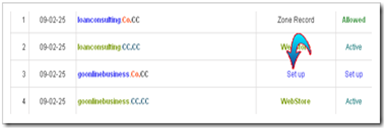
  2. Click Set up at your new domain name as seen at the screenshot below, then it will appear the words Please domain setup now as the notification that your new domain name of Co.CC has not been set up.

    image

  3. Click the words Please domain setup now to set up your new domain name of Co.CC. On this page, you will choose one of the three domain setup as Manage DNS, Zone Record, and URL Forwarding. For those who want to change the blogspot domain name with Co.CC, you should choose the Zone Record by click it or its radio button.

    3zone

  4. After you choose Zone Record, there will appear the setting option as the screenshot below image

    At the dialogue box, fill the Host with your domain name of Co.CC, e.g. www.loanconsulting.Co.CC (the Host name of my Co.CC domain). Then at TTL let it as 1D, for Type, choose CNAME, and Value fill with ghs.google.com. After all fields are filled out, click the Set up button. You can see the example of my setting as the screenshot below image

  5. Now you finish setting your new Co.CC domain, but usually you have to wait for about 48 hours until your new domain is active.

Well, now it’s time to change the blogspot domain with Co.CC domain. Please follow the steps below:

  1. Log in to blogger with your account.
  2. Click Settings at the dashboard

    image

  3. At the Settings page, click Publishing

    image

  4. When you are at the Publishing page, click Custom Domain

    image

  5. At the page of Publishing on custom domain, you are not asked to buy the domain (except you want it), but we will use the blogspot domain that we have made, then click Switch to advanced settings to change your blogspot domain with Co.CC domain.

    clickswitch

  6. At the page of Advanced Settings fill with your Co.CC domain at the field of Your Domain e.g. www.loanconsulting.Co.CC (it’s my Co.CC domain). The for Use a missing files host? Leave it as No and at the field of Word Verification fill with the words that appear with blur (colored and unclear). After all fields are filled out, click Save Settings. image
  7. Be sure that Save Setting at Point 6 is successful with the sign as the words Settings Were Saved Successfully at upper right of the page

    image

  8. You have finished changing your blogspot domain with Co.CC domain.

Note: usually you have to wait for about 48 hours until your new domain is active as Co.CC regulation.

If you are interested in changing your blogspot domain with Co.CC domain, happy trying and good luck.